Remove the DNSFilter application from a Windows computer.
- Download the Windows Uninstaller tool from this link.
- Open the file. The easiest way to do this is to choose the Open File prompt in your web browser.
- You should see a Command Prompt window and an option box like this; choose Yes to continue to uninstall.
- When you see a window like this, select OK:
- Allow the setup to complete (this may take a few minutes):
- You will likely see an alert like the one below. DNSFilter needs to be stopped completely, so select OK to proceed:
- After this is done, you can safely close the Command Prompt window:
- Run a standard test on the dnsleaktest.com website. This website checks the DNS Servers your device is currently using.
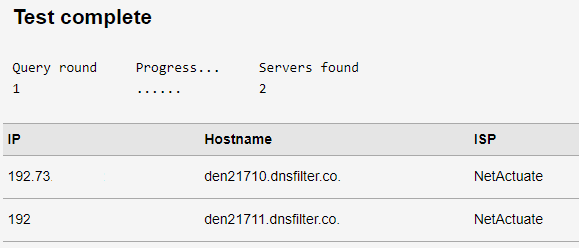
After running a standard test on the website above, view the list of results. You should not see "dnsfilter.co" and "NetActuate" listed as the Hostname and ISP, respectively.
Here's an example of a test where DNS Filter is still active: