Remove the DNSFilter application from a Mac computer.
- Download the Mac Uninstaller tool from this link.
- Open the file. The easiest way to do this is by double-clicking the file in your Downloads folder.
You should see a screen like this:
- Click Continue to progress through the steps. Leave everything to its default values.
- Install for all Users.
- Select the Install button when prompted:
You will likely see two authentication messages.
- One will ask if you'd like to install new software:
- The other will ask for permission to remove DNSFilter from System Extensions:
Once complete, you should see a message like this:
- Run a standard test on the dnsleaktest.com website. This website checks the DNS Servers your device is currently using.
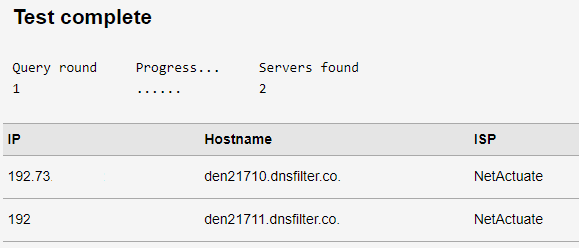
After running a standard test on the website above, view the list of results. You should not see "dnsfilter.co" and "NetActuate" listed as the Hostname and ISP, respectively.
Here's an example of a test where DNS Filter is still active: